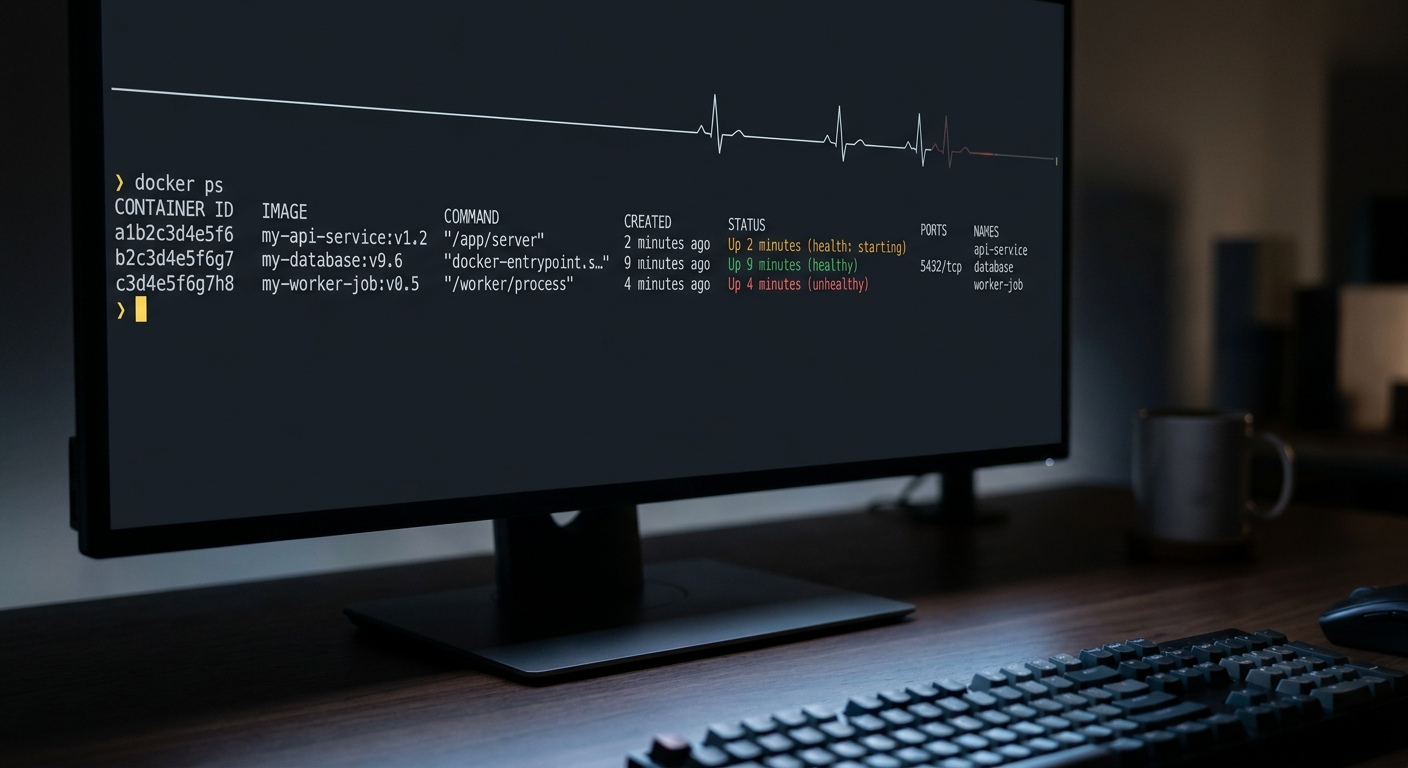
A Docker HEALTHCHECK is one line in your Dockerfile that runs a command inside the container every so often and decides whether the container is healthy. Exit 0 means healthy, exit 1 means unhealthy, and the result shows up in the STATUS column when you run docker ps. Here is the whole instruction in its simplest form:
HEALTHCHECK CMD curl --fail http://localhost:8080/health || exit 1
That is the answer. The rest of this covers the flags and their real defaults, the exit codes people get wrong, the Compose version of the same thing, how to read the health status, and the part most guides skip: what a healthcheck does not do. It will not restart your container on its own, and it will never tell a human that something broke.
What does a Docker HEALTHCHECK actually do?
Docker runs your check command on a timer. It starts the container, waits an interval, runs the command, looks at the exit code, and repeats. The container carries a health state that moves through three values:
startingright after launch, while the container settles.healthyonce a check passes.unhealthyafter enough checks fail in a row.
You see this state directly in docker ps, tucked into the STATUS column:
CONTAINER ID   IMAGE      STATUS
a1b2c3d4e5f6   api:latest Up 2 minutes (healthy)
b2c3d4e5f6a7   web:latest Up 5 minutes (health: starting)
c3d4e5f6a7b8   job:latest Up 9 minutes (unhealthy)
That is the entire visible payoff of a healthcheck on a single host: a truthful label. Docker updates the label. What happens next is up to you or your orchestrator, which is the point most people miss and we come back to below.
How do I add a HEALTHCHECK to a Dockerfile?
The instruction has two forms. The common one runs a command:
HEALTHCHECK [OPTIONS] CMD command
The other disables a healthcheck that a base image already set:
HEALTHCHECK NONE
Only the last HEALTHCHECK in the Dockerfile takes effect, so if your base image defines one and you want your own, just declare it again.
The CMD part behaves like CMD everywhere else in a Dockerfile. Write it as a plain shell string and Docker runs it through /bin/sh -c, which gives you pipes, ||, and variable expansion:
HEALTHCHECK --interval=30s --timeout=3s \
  CMD curl --fail http://localhost:8080/health || exit 1
Write it as a JSON array and Docker runs it directly with no shell, which is faster and avoids quoting surprises:
HEALTHCHECK CMD ["curl", "--fail", "http://localhost:8080/health"]
A few things bite people here. The command runs inside the container, so localhost is the container's own loopback, and whatever binary you call has to be in the image. curl is not present on Alpine or distroless bases unless you add it. curl --fail returns a non-zero exit code on any HTTP error, which is exactly what you want, and the trailing || exit 1 normalizes every failure to a clean 1 so you never accidentally return the reserved code we cover next.
If your base image is slim, skip curl and use what is already there:
# wget is on many minimal images
HEALTHCHECK CMD wget --quiet --spider http://localhost:8080/health || exit 1

# no HTTP client at all: check the port with a bash redirect
HEALTHCHECK CMD bash -c 'echo > /dev/tcp/127.0.0.1/8080' || exit 1
For a distroless image with no shell, the clean answer is to build a tiny static binary that calls your own endpoint and COPY it in, then point the check at it.
What do the HEALTHCHECK flags mean?
Five options control the timing. These are the current defaults straight from the Docker docs:
--interval(default30s) is the time between checks once the container is up.--timeout(default30s) is how long a single check may run before it counts as a failure.--start-period(default0s) is a startup grace window where failures do not count against retries.--start-interval(default5s) is how often to check during the start period.--retries(default3) is how many failures in a row flip the container tounhealthy.
Two of these matter more than the rest. Set --timeout well below --interval, because a check that hangs should be killed and recorded as a failure, not left to overlap the next one. Set --start-period to a bit more than your app's real cold-start time so a slow boot does not get marked unhealthy before it has a chance to answer. The default 30s timeout is far too generous for a health endpoint that should reply in milliseconds; drop it to two or three seconds.
--start-interval is the newest of these and the one older guides omit. It lets Docker poll more frequently during the start period so a container is declared healthy sooner after boot, instead of waiting a full --interval. It requires Docker Engine 25.0 or later.
What do the exit codes mean?
Docker reads exactly one thing from your check: the exit code. There are three defined values, and one of them surprises people:
0success. The container is healthy.1unhealthy. The container is not working correctly.2reserved. Do not use this exit code.
Most write-ups say "any non-zero means unhealthy." That is close but not correct: 2 is reserved, so a check that happens to exit 2 is not a clean unhealthy signal. This is the real reason the || exit 1 idiom is everywhere. It forces every failure path down to 1 regardless of what the underlying command returned, so you never land on the reserved code by accident.
One debugging detail worth knowing: Docker stores the output of your check so you can see why it failed, but only the first 4096 bytes are kept. If your check dumps a wall of text, the useful line can get truncated, so keep the command quiet and let the exit code carry the verdict.
How do I set a health check in Docker Compose?
Compose has the same feature under a healthcheck key, with snake_case names instead of flags:
services:
  api:
    image: api:latest
    healthcheck:
      test: ["CMD", "curl", "--fail", "http://localhost:8080/health"]
      interval: 30s
      timeout: 3s
      retries: 3
      start_period: 20s
      start_interval: 5s
The test field takes the same two shapes as the Dockerfile. ["CMD", ...] runs the command directly with no shell. ["CMD-SHELL", "..."] wraps it in a shell so you get pipes and ||, which you need for the || exit 1 pattern:
    healthcheck:
      test: ["CMD-SHELL", "curl --fail http://localhost:8080/health || exit 1"]
The payoff in Compose is depends_on with a condition. A service can wait for another to report healthy before it starts, which fixes the classic race where the app boots before its database is ready:
services:
  db:
    image: postgres:16
    healthcheck:
      test: ["CMD-SHELL", "pg_isready -U postgres"]
      interval: 5s
      timeout: 3s
      retries: 5
  api:
    image: api:latest
    depends_on:
      db:
        condition: service_healthy
Note what this does and does not do. It gates startup order. It does not keep restarting api if db goes unhealthy later, and it does not tell you when that happens.
How do I check a container's health status?
Three ways, in increasing detail. The STATUS column of docker ps shows the current state inline, which is enough for a quick look. For the full record, inspect the health object:
docker inspect --format '{{json .State.Health}}' my-container
That returns the current Status, a FailingStreak counter of how many checks have failed in a row, and a Log array of the recent checks with their timestamps, exit codes, and captured output. When a container is flapping, the FailingStreak and the log entries tell you whether the check is failing outright or timing out. To watch state changes as they happen rather than polling, subscribe to Docker events and filter for health:
docker events --filter event=health_status
Does an unhealthy container restart itself?
No, and this is the assumption that burns people. On a standalone Docker host, the health status is a label and nothing more. An unhealthy container keeps running, keeps accepting traffic, and keeps serving errors. Docker's --restart policy does not help here, because it reacts to a container process exiting, not to a running container being marked unhealthy.
Something has to act on the label:
- Swarm reschedules a service task whose container goes unhealthy. If you run Swarm, health drives real recovery.
- Kubernetes does the same with its own liveness and readiness probes, which are a separate mechanism from the Dockerfile
HEALTHCHECKbut the same idea. - A small watcher covers plain Docker. The community
autohealcontainer watches for any container marked unhealthy and restarts it, which is the usual fix when you are not running an orchestrator.
So the healthcheck is doing its job by producing an honest status. Whether that status turns into a restart depends entirely on what is watching it.
What a Docker healthcheck won't catch
A healthcheck runs inside the container. That single fact is also its ceiling. It can only report while the container and the host are alive to run the command, so a whole class of failures is invisible to it:
- The container crashed or was killed. There is nothing left to run the check.
- The container never started, because the deploy failed or the image would not pull. No container, no check.
- The host rebooted and the daemon did not bring your container back. Silence.
- The container reports
unhealthyat 3am and, on standalone Docker, that label just sits there. Nobody is paged.
That last one is the gap that matters. A healthcheck answers "is this process healthy right now," from the inside, to whatever is watching locally. It does not answer "is my service actually reachable from the outside, and did a human find out when it stopped." For that you need a check that lives outside the box: an external uptime probe that hits your public URL, or a heartbeat monitor that expects a regular ping and alerts on silence when the container is gone entirely.
The two layers are complementary. Keep the HEALTHCHECK so your orchestrator can recycle a sick container automatically. Add outside monitoring so that when the container, the host, or the deploy disappears, something notices and tells you. CanaryHub does the outside layer for indie apps: it watches your public endpoints and your cron heartbeats and pings you on Telegram the moment one goes quiet, which is precisely the failure a container health check can never report.